Tuesday, July 19, 2016

Dave Computes 3-D Graphics From Scratch

Programming languages like Java have excellent built-in libraries for 2-D graphics, but those of us interested in programming in 3-D must experiment with a number of difficult-to-use external libraries. I've had very few students use 3-D in their projects successfully, and those projects have taken months to come together. This past spring I set out to learn to program 3-D graphics from scratch. After many false starts, it proved to be surprisingly easy to create some simple but cool-looking 3-D projects.

I started by coding from formulas I found online. But without understanding the formulas, I was unable to debug them. A key insight, therefore, was figuring out how to code 3-D through a series of understandable stages, as I will present below.

I definitely recommend coding an overhead 2-D view before modifying the code to present 3-D graphics. It's even helpful to switch back and forth between the two views in your testing, or to show both views on the screen at the same time. And so we'll begin with the basics of 2-D graphics.


2-D Basics

I'll assume my reader is comfortable coding with 2-D graphics. The top-left corner of the screen has coordinates (0, 0), with x-coordinates increasing to the right, and y-coordinates increasing going down the screen.


Let's suppose we have a collection of points with x- and y-coordinates.


The following pseudocode illustrates how we might draw a circle at each of these points.

for (Point p : points)
drawCircle(p.x, p.y, RADIUS);

Here is the result of running this code for a very simple maze.


The red dot represents our avatar, located at (avx, avy). We might use the keyboard to move the avatar around the space as follows.

if (leftButton)  avx -= SPEED; //move west
if (rightButton) avx += SPEED; //move east
if (upButton)    avy -= SPEED; //move north
if (downButton)  avy += SPEED; //move south

In the second picture below, our avatar has moved north.


Scrolling

My students often ask nervously about making "scrolling" video games (like Super Mario Bros). They expect that scrolling will change everything about the code. In actuality, only the code that performs the drawing needs to change. (It will be the same way when we get to 3-D.)

Specifically, when drawing, we're no longer interested in the absolute position of each point. Instead, we need to know where that point is relative to our avatar. For example, if the avatar is at (100, 50) and a particular point is at (110, 30), then we need to draw that point 10 pixels east and 20 pixels north of the avatar (or -20 pixels south). We'll call these values relx and rely, and we'll compute them as follows.

relx = p.x - avx;
rely = p.y - avy;

These relative coordinates will be far more useful to us than the absolute ones.

We'll always draw the avatar in the center of the screen (CENTER, CENTER), so we should draw this particular point at (CENTER + 10, CENTER - 20). Here's how our code looks now.

for (Point p : points)
{
  relx = p.x - avx;
  rely = p.y - avy;
  drawCircle(CENTER + relx, CENTER + rely, RADIUS);
}

The second picture below shows what it looks like now when our avatar moves north. The red circle representing the avatar remains in the center of the screen, while everything else appears to move.


Looking Down on a 3-D World

So far, we've only shown overhead views of the world, where the camera is looking down on the world. In the overhead views we've seen, the screen's horizontal axis corresponds to the east-west direction, and the screen's vertical axis corresponds to the north-south direction.


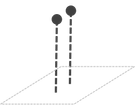
Imagine that each of the points we see represents a tall stake sticking up out of the ground.


The stakes point in the up-down direction (along the z-axis), which we cannot perceive from an overhead view. (If some stakes are taller than others, we won't know it.)


Looking North in a 3-D World

Now it's time to work out what our avatar sees. We'll start by assuming the avatar's camera is pointing north.

In this view, the screen's horizontal axis still corresponds to the east-west direction, but the screen's vertical axis now corresponds to the up-down direction--the direction the stakes point.


In this view, we cannot tell north from south anymore. If some stakes are further north than others, we won't know it.


We now draw each stake as a vertical line projected onto the screen.


For the moment, our drawing code no longer depends on rely.

for (Point p : points)
{
  relx = p.x - avx;
  rely = p.y - avy;
  drawLine(CENTER + relx, 0, CENTER + relx, BOTTOM);
}

The second picture below shows the avatar's view of the world, looking north.


Clearly this is disappointing, but we're only in the early stages of implementing 3-D.

What exactly are we looking at? Notice that there are 13 circles at the bottom of the left image, and 13 lines on the right image. If several circles appear in the same column of the left image, they all appear as a single overlapping line on the right image.


Looking Ahead

Notice that all of the circles in the first four columns of the left image (above) are behind the avatar (who is facing north). But we see lines representing those same points on the right image. Since our avatar should not be able to see behind it, clearly we should not draw those lines.

In the overhead view, the avatar's line-of-sight forms an imaginary line pointing north from the avatar to the top of the screen. For any given point we intend to draw, imagine a horizontal line running through that point and perpendicular to the line-of-sight. We'll refer to such a line as a horizon, and it will play a very important role in the rest of our calculations. Right now, we simply wish to know the distance from the avatar to a particular point's horizon. We'll call this value toHoriz. It should be positive for points ahead of the avatar and negative for points behind it.

For now, toHoriz is simply -rely.


In the 3-D view, we should only draw points that have a positive value for toHoriz, as shown in the code below.

for (Point p : points)
{
  relx = p.x - avx;
  rely = p.y - avy;
  toHoriz = -rely;
  if (toHoriz > 0)
    drawLine(CENTER + relx, 0, CENTER + relx, BOTTOM);
}

The resulting 3-D view is shown in the righthand image.


Perspective Height

It bothers us that all of the lines in the 3-D view are the same height, when we know that objects that are further away should appear shorter. Specifically, an object's apparent height should be inversely proportional to its distance away, as expressed by:

appHeight = VCONST / toHoriz;

The "vertical" constant in this formula should be adjusted to match the desired perspective.

for (Point p : points)
{
  relx = p.x - avx;
  rely = p.y - avy;
  toHoriz = -rely;
  if (toHoriz > 0)
  {
    appHeight = VCONST / toHoriz;
    drawLine(CENTER + relx, CENTER - appHeight,
             CENTER + relx, CENTER + appHeight);
  }
}

The resulting 3-D view is shown in the righthand image.


Perspective Width

Of course, now it bothers us that all of the lines in the 3-D view are the same distance apart, when we know that objects that are further away should appear closer together. Specifically, the x-coordinate where an object appears (relative to the center of the screen) should be inversely proportional to its distance away, as expressed by:

screenx = HCONST * relx / toHoriz;

Again, this new constant should be adjusted to match the desired perspective. We'll now use screenx to draw the objects, instead of relx.

for (Point p : points)
{
  relx = p.x - avx;
  rely = p.y - avy;
  toHoriz = -rely;
  if (toHoriz > 0)
  {
    appHeight = VCONST / toHoriz;
    screenx = HCONST * relx / toHoriz;
    drawLine(CENTER + screenxCENTER - appHeight,
             CENTER + screenx, CENTER + appHeight);
  }
}

The resulting 3-D view is shown in the righthand image.  Note the improvement!


Rotating and Moving

So far, we've looked at situations where the avatar always points north, and the world translates in the four cardinal directions: east, west, north, and south. Next, we'll see how to rotate the avatar/camera. This means we'll now need to keep track of the avatar's angle, in addition to its position (avx, avy).

For this, we'll need to adopt a convention for interpreting the avatar's angle. We'll say that pointing due north corresponds to an angle of 0 degrees. A clockwise rotation (to the right) corresponds to a positive angle, so that east is at 90 degrees, south is at 180 degrees, and west is at -90 or 270 degrees.


Instead of causing movement, the left and right buttons will now rotate by some fixed angle.

if (leftButton)  angle -= ANGLE_SPEED; //rotate left
if (rightButton) angle += ANGLE_SPEED; //rotate right

We want the up button to move forward in whatever direction the avatar is pointing. When the avatar is pointing north (0 degrees), moving forward should decrease avy. When the avatar is pointing east (90 degrees), moving forward should increase avx. For angles in between, moving forward will alter both avx and avy, with the change depending on the sine or cosine of the angle, as shown in the table below.

angle  avx change    avy change
 0     SPEED * 0     SPEED * -1
90     SPEED * 1     SPEED *  0
 A     SPEED * sinA  SPEED * -cosA

Here is the resulting code.

if (upButton) //move forward
{
  avx += SPEED * sin(angle);
  avy -= SPEED * cos(angle);
}
if (downButton) //move backward
{
  avx -= SPEED * sin(angle);
  avy += SPEED * cos(angle);
}


Overhead Rotation

We now return to our overhead scrolling program, but now our avatar has an angle indicating which direction it is heading. We want the parts of the world that are ahead of the avatar to appear at the top of the screen. When the avatar is facing north (0 degrees), the distance to the horizon (toHoriz) remains -rely. But, when the avatar is facing east (90 degrees), the distance to the horizon is now relx. For angles in between, toHoriz is a mix of relx and rely, as shown in the table below.

angle  toHoriz
 0     relx * 0    + rely * -1
90     relx * 1    + rely *  0
 A     relx * sinA + rely * -cosA

Each point occurs on a horizon, some distance from the avatar's line of sight. We'll call this distance onHoriz, and it will be positive for points to the avatar's right and negative for points to the avatar's left.


When the avatar is facing north (0 degrees), onHoriz is simply relx (which is why we didn't bother introducing it earlier). When the avatar is facing east (90 degrees), onHoriz is rely. For angles in between, onHoriz is a mix of relx and rely, as shown in the table below.

angle  onHoriz
 0     relx * 1    + rely * 0
90     relx * 0    + rely * 1
 A     relx * cosA + rely * sinA

Now our overhead drawing code reads as follows.

for (Point p : points)

{

  relx = p.x - avx;

  rely = p.y - avy;

  onHoriz = relx * cos(angle) + rely * sin(angle);

  toHoriz = relx * sin(angle) - rely * cos(angle);

  drawCircle(CENTER + onHoriz, CENTER - toHoriz, RADIUS);

}


The righthand image shows the overhead view when the avatar rotates 30 degrees to the right.


3-D Rotation

We now apply our calculation of onHoriz and toHoriz to our 3-D code. The change is surprisingly small. We simply calculate onHoriz and toHoriz as we did in the overhead code, and we compute screenx from onHoriz instead of relx.

for (Point p : points)
{
  relx = p.x - avx;
  rely = p.y - avy;
  onHoriz = relx * cos(angle) + rely * sin(angle);
  toHoriz = relx * sin(angle) - rely * cos(angle);
  if (toHoriz > 0)
  {
    appHeight = VCONST / toHoriz;
    screenx = HCONST * onHoriz / toHoriz;
    drawLine(CENTER + screenx, CENTER - appHeight,
             CENTER + screenx, CENTER + appHeight);
  }
}

In the second image below, the camera has turned right by about 6 degrees.


Moving Up and Down

So far, our avatar and its camera have remained at a fixed height. But what if we want to move our avatar up and down along the z-axis? First, we'll start by modifying our point objects to store an x-, y-, and z-coordinate. We'll also need to keep track of the avatar's z-coordinate (avz). We'll also modify our arrow keys to allow us to move our avatar east-west and up-down only.

if (leftButton)  avx -= SPEED; //move west
if (rightButton) avx += SPEED; //move east
if (upButton)    avz += SPEED; //move north
if (downButton)  avz -= SPEED; //move south

Here, we've chosen to have z-coordinate values increase as we move upward. For simplicity, we cannot change the y-coordinate to move north-south. (We might choose to have the avatar perpetually moving northward, so that it appears as if we're flying through a 3-D space.) We are also assuming that our camera will always point north again.

In our drawing code, we must now compute a relative z (relz) value. In addition to determining the apparent x-coordinate where the object will be drawn on the screen, we must also compute an apparent y-coordinate, based on the relz value. We'll draw each point as a circle, and so we will need to compute the apparent radius screenr.  As before, the larger toHoriz is, the smaller screenx, screeny, and screenr should be. Therefore, these values must all be divided by toHoriz. The resulting code is shown below.

for (Point p : points)
{
  relx = p.x - avx;
  rely = p.y - avy;
  relz = p.z - avz;
  toHoriz = -rely;
  if (toHoriz > 0)
  {
    screenx = HCONST * relx / toHoriz;
    screeny = VCONST * relz / toHoriz;
    screenr = RCONST / toHoriz;
    drawCircle(CENTER + screenx,
               CENTER + screeny,
               screenr);
  }
}

The left image below shows a view northward into a tunnel with a square cross section. In the right image, the camera has moved upward, so that we can now look down on the top of the tunnel structure.


Simple Improvements

One simple improvement we can easily implement is to draw so that objects nearer to the camera appear in front of objects that are further away. To do so, we need only to sort the list of objects from furthest to nearest, and draw them in that order. The sorting should occur every time an object moves, thus requiring re-rendering. Assuming that the camera and objects only move in small increments, insertion sort would probably be the most efficient sorting algorithm. Distances for sorting are determined by the Pythagorean formula:  sqrt(relx^2 + rely^2 + relz^2). For purposes of comparison, it is not necessary to perform the square-root operation.

We can also use Pythagorean distance to determine when the avatar would collide with another object. This would allow us to introduce walls and other objects that can interact with the avatar.

We can also create a more attractive 3-D world through simple touches, like drawing a horizon line in the background between the sky and the ground.


Final Notes

Obviously, we have only scratched the surface of 3-D rendering. We have only rotated our camera around one of three axes (the z axis). We have not considered drawing complex structures with 3-dimensional surfaces--only some of which can be visible to the camera. But I believe that we have hit on many of the areas of interest to high school students developing simple 3-D video games.

Friday, July 8, 2016

Dave Computes with Tag Systems

Overview

A tag system is arguably the simplest universal model of computation. It consists of a set of rules for rewriting strings, in which a fixed number of symbols are deleted from the beginning of a string and new symbols are added to the end. For example:

When a string starts with 0, remove the first 2 symbols and append 20.
When a string starts with 1, remove the first 2 symbols and append 01010.

We'll summarize the rules of this system as:

0x -> 20
1x -> 01010

These rules tell us to rewrite the string 10 as 01010, and to rewrite that as 01020, and so on, resulting in the following process:

10, 01010, 01020, 02020, 02020, 02020, ...

This process repeats a string that has already been reached, resulting in an infinite loop. Repeating is one of four possible outcomes when using a tag system. Halting is another outcome, which occurs when there is no rule for the starting symbol:

001, 120, 001010, 101020, 102001010, 200101001010

A related outcome is an underflow, in which the string length shrinks to below the deletion number, as would trivially be true for any one-character string in this particular system. Finally, a string can grow without bound:

101, 101010, 101001010, 100101001010, 010100101001010, 010010100101020, 001010010102020, 101001010202020, 100101020202001010, 010102020200101001010, 010202020010100101020, 020202001010010102020, 020200101001010202020, 020010100101020202020, 001010010102020202020, 101001010202020202020, 100101020202020202001010, ...

We might call this behavior overflow or blowing up. (We can prove this particular string grows without bound by noting that the number of 2's grows from 0, to 3, to 6, to 9, etc.)

Every tag system has a number of symbols (3 for this system), a rule for each symbol (possibly excluding a halting symbol), and a deletion number (2 for this system).

I wrote a program to systematically test various simple tag systems. Here are a few of my favorites.


1-Tag Systems

We'll start with a simple 1-tag system (a system with deletion number 1).

0 -> 0
1 -> 01

This is a 1-tag system, because its deletion number is 1. Starting from the string 1, this system generates the following process.

1
01
10
001
010
100
0001
0010
0100
1000
00001

The boldface indicates that 1 is rewritten as 01. When we rewrite all of its symbols we get 001, which is fully rewritten as 0001, which becomes 00001, and so on. We can therefore think of this system as repeatedly inserting a single 0 at the front of the string.

A slight change to these rules results in a much more interesting tag system.

0 -> 1
1 -> 01

From starting string 0, this system gives us:

0
1
01
11
101
0101
1011
01101
11011
101101
0110101
1101011
10101101

We can easily show that any string will blow up in this system. At first, the blow up appears to be quite chaotic, but upon closer inspection we find the Fibonacci sequence in the lengths of the boldface strings. Specifically, string 0 (length 1) is rewritten as 1 (length 1), which is rewritten as 01 (length 2). When both of its digits are rewritten, we get 101 (length 3), and when all of its digits are rewritten we get 01101 (length 5), and then 10101101 (length 8). Furthermore, just as each Fibonacci number is the sum of the two previous Fibonacci numbers, each of these fully rewritten strings consists of the concatenation of the previous two such strings. For example, 01101 (the string corresponding to 5) consists of 01 (the string corresponding to 2) followed by 101 (the string corresponding to 3).

We might wonder how quickly these strings are growing. Do they grow in a linear fashion, so that each string grows on average by k characters, and the expected length of the nth string is kn? One thing we know about the Fibonacci sequence is that the next term is 1.618... (the golden ratio) times the current term (in the limit). That means that if the string representing the current Fibonacci number has length L, then L terms later it will be rewritten to have length 1.618L (roughly), or L + 0.618L. Therefore, the string grew by 0.618L over the course of L steps, or by an average of 0.618 symbols per step. After n steps, the string ought to be roughly 0.618n symbols long.

We can interpret the rule 1 -> 01 as finding the sum of the previous term in a numerical sequence (0) plus the current term (1). An interesting variation is to use the rule 1 -> 011, which finds the sum of the previous term (0) plus twice the current term (11). That gives us the following rules.

0 -> 1
1 -> 011

Starting from 0, the sequence of fully rewritten strings is now:

0 (length 1)
1 (length 1)
011 (length 3)
1011011 (length 7)
01110110111011011 (length 17)

That gives us the sequence 1, 1, 3, 7, 17, 41, ..., where adding the previous term to twice the current term gives us the next term. Here, we can prove the common ratio is 1 + sqrt(2), and from that we conclude that each string is growing by roughly sqrt(2) symbols, and that the nth string will consist of roughly 1.414n symbols. In the same way, the rule 1 -> 0011 gives us the common ratio 1 + sqrt(3), with strings growing by sqrt(3) symbols. In general, if the rule for rewriting the symbol 1 consists of a zeros and b ones, then the common ratio will be [b + sqrt(b^2 + 4a)] / 2.


Tag Systems relating to the Collatz Conjecture

Consider the following 2-tag system (a system with deletion number 2).

0x -> 1
1x -> 02
2x -> 111

Starting from the string 111, this system results in the following process:

111 (3)
102
202
2111
11111 (5)
11102
10202
20202
202111
2111111
11111111 (8)
11111102
11110202
11020202
02020202
0202021
020211
02111
1111 (4)
1102
0202
021
11 (2)
02
1 (1)

What is happening here? If we consider only the boldface steps (those consisting of all ones), we have produced the sequence 3, 5, 8, 4, 2, 1. When a number is even, we halve it. When a number is odd, we triple it, add 1, and (since the resulting number is always even) we immediately halve it.

even -> divide by 2
odd -> multiply by 3, then add 1, then divide by 2

Thus, the question of whether all positive integers (represented as a sequence of ones) will result in an underflow (terminating with a single 1) is equivalent to the famous Collatz conjecture (the 3n+1 problem). Every positive integer ever tested does result in an underflow. Proving this is true for all positive integers or disproving it would be a big deal. This is a significant open problem in mathematics.

Let's take a closer look at the rules for this system, shown again here.

0x -> 1
1x -> 02
2x -> 111

We have a rule that shrinks by 1 symbol (0x -> 1), a rule that grows by 1 symbol (2x -> 111), and a rule that replaces a string of 1s with a string of 02s (1x -> 02). If the original string of 1s has an even length, it is replaced by an equal length of 0202...02, resulting in the shrink rule firing. If the original string of 1s has an odd length, it is replaced by an equal length of 2020...2, resulting in the growth rule firing. In other words, 2-tag systems let us test if a string's length is odd or even. In this case, we have roughly an equal chance of growing by 1 or shrinking by 1, which is what appears to make this system teeter on the edge of underflow and blowing up.

Of course, we would also have an equal chance of growing or shrinking if we rewrote 1x as 20 (instead of 02). Let's see how the resulting system behaves.

0x -> 1
1x -> 20
2x -> 111

Starting from 11111 (5), we get to a single 1 and underflow:

11111 (5)
11120
12020
02020
0201
011
11 (2)
20
111 (3)
120
020
01
1 (1)

On the other hand, starting from 1111 (4), we eventually repeat the 4, resulting in an infinite loop:

1111 (4)
1120
2020
20111
111111 (6)
111120
112020
202020
2020111
20111111
111111111 (9)
111111120
111112020
111202020
120202020
020202020
02020201
0202011
020111
01111
1111 (4)
...

Here is the simple rule describing these number sequences:

odd -> divide by 1 (discarding any remainder)
even -> multiply by 3/2

Starting from any positive integer from 1 to 15, we either reach the number 1 (resulting in an underflow) or the number 4 (resulting in an infinite loop):

11, 5, 2, 3, 1
4, 6, 9, 4, ...
14, 21, 10, 15, 7, 3, 1
8, 12, 18, 27, 13, 6, 9, 4, ...

Starting from 16, we find a new infinite loop:

16, 24, 36, 54, 81, 40, 60, 90, 135, 67, 33, 16, ...

Now every number reaches 1, 4, or 16. (Mathematically, it may make more sense to stop at 0 instead of 1.) Are there other scenarios? I wrote a program to find out. The program tested integers up to 1 billion. Amazingly, every single number reached 1, 4, or 16. Even stranger, I found that

32.6868782% of numbers reach 1,
32.4952364% reach 4, and
34.8178854% reach 16.

How crazy is it that these are so closely balanced, and yet never seem to arrive at 1/3! These percentages appear to be remarkably stable (approximately true for numbers from 1 to n, regardless of the exact value of n.)

We can also create 3-tag systems based on the same idea.  For example:

0xx -> 1
1xx -> 022
2xx -> 1111

Notice that the 1xx -> 022 rule ensures that the 2xx rule (which adds 1 to the length of the string) will run twice as often as the 0xx rule (which subtracts 2), meaning that growing and shrinking are approximately balanced. The same is true if we use 1xx -> 202 or 1xx -> 220. Each of these rules produces different chaotic number sequences with seemingly no blow up. The same is true of:

0xx -> 11
1xx -> 002
2xx -> 11111

This system corresponds to:

(n mod 3 == 0) -> 2n / 3
(n mod 3 == 1) -> (5n + 4) / 3
(n mod 3 == 2) -> (2n - 1) / 3

All inputs tested result in underflow with final string 11 (2). (Mathematically, it may make more sense to stop at 1.) An input of 1111111111111111111 (19) doesn't underflow until 1,619 steps! Here is the resulting sequence:

19, 33, 22, 38, 25, 43, 73, 123, 82, 138, 92, 61, 103, 173, 115, 193, 323, 215, 143, 95, 63, 42, 28, 48, 32, 21, 14, 9, 6, 4, 8, 5, 3, 2

Similarly interesting behavior is observed for the rule 1xx -> 020 or 1xx -> 200.


Chaotic Tag Systems 

I'm especially interested in cases where a simple input in a simple tag system survives for a large number of steps before underflowing. Perhaps the most studied tag system is

0xx -> 00
1xx -> 1101

Let's observe what happens for input 111.

111
1101
11101
011101
10100
001101
10100 [repeat]

As we can see, an input of 111 repeats on the 7th step. An input of 1111 repeats on the 6th step. Here's a summary of this tag system's behavior on inputs consisting only of ones:

3 ones -> repeat on step 7
4 ones -> repeat on step 6
5 ones -> repeat on step 23
6 ones -> repeat on step 22
7 ones -> repeat on step 21
8 ones -> repeat on step 18
9 ones -> repeat on step 17
10 ones -> repeat on step 16
11 ones -> repeat on step 33
12 ones -> repeat on step 32
13 ones -> repeat on step 31

Doesn't sound particularly exciting, until we discover that an input of 20 ones repeats on step 2,158, and an input of 14 ones underflows on step 411. Here are some excerpts of that process, along with the length of the string at each step.

11111111111111  (14)
111111111111101  (15)
1111111111011101  (16)
11111110111011101  (17)
111101110111011101  (18)
1011101110111011101  (19)
11011101110111011101  (20)
111011101110111011101  (21)
0111011101110111011101  (22)
101110111011101110100  (21)
...
101110111011101110111010000000000110111011101000000  (51)
1101110111011101110100000000001101110111010000001101  (52)
11101110111011101000000000011011101110100000011011101  (53)
011101110111010000000000110111011101000000110111011101  (54)
10111011101000000000011011101110100000011011101110100  (53)
110111010000000000110111011101000000110111011101001101  (54)
1110100000000001101110111010000001101110111010011011101  (55)
01000000000011011101110100000011011101110100110111011101  (56)
0000000001101110111010000001101110111010011011101110100  (55)
000000110111011101000000110111011101001101110111010000  (54)
00011011101110100000011011101110100110111011101000000  (53)
1101110111010000001101110111010011011101110100000000  (52)
...
0000000000110100110100001101110111011101001101  (46)
000000011010011010000110111011101110100110100  (45)
00001101001101000011011101110111010011010000  (44)
0110100110100001101110111011101001101000000  (43)
010011010000110111011101110100110100000000  (42)
01101000011011101110111010011010000000000  (41)
0100001101110111011101001101000000000000  (40)
000110111011101110100110100000000000000  (39)
11011101110111010011010000000000000000  (38)
111011101110100110100000000000000001101  (39)
0111011101001101000000000000000011011101  (40)
101110100110100000000000000001101110100  (39)
1101001101000000000000000011011101001101  (40)
10011010000000000000000110111010011011101  (41)
110100000000000000001101110100110111011101  (42)
1000000000000000011011101001101110111011101  (43)
00000000000000110111010011011101110111011101  (44)
0000000000011011101001101110111011101110100  (43)
000000001101110100110111011101110111010000  (42)
00000110111010011011101110111011101000000  (41)
0011011101001101110111011101110100000000  (40)
101110100110111011101110111010000000000  (39)
...
000000000000001101  (18)
00000000000110100  (17)
0000000011010000  (16)
000001101000000  (15)
00110100000000  (14)
1010000000000  (13)
00000000001101  (14)
0000000110100  (13)
000011010000  (12)
01101000000  (11)
0100000000  (10)
000000000  (9)
00000000  (8)
0000000  (7)
000000  (6)
00000  (5)
0000  (4)
000  (3)
00  (2)

Notice the complex patterns in this computation.

Of the tag systems I discovered in my research, this next one is probably my favorite:

0xx -> 0
1xx -> 11001

Here, an input of 111, arguably the simplest possible input, takes 588 steps to underflow! An input of 24 ones takes 5,274 steps to underflow, and an input of 30 ones takes an amazing 90,263 steps to underflow!

Here are some other tag systems with long underflows:

0x -> 0, 1x -> 002, 2x -> 112, starting from 11, takes 780 steps to underflow.
0x -> 0, 1x -> 012, 2x -> 0102, starting from 111, takes 46,119 steps to underflow.
0xx -> 00, 1xx -> 10011, starting from 1111, takes 11,200 steps to underflow.
0x -> 0, 1x -> 0022, 2x -> 0102, starting from 1111, takes 65,923 steps to underflow.


Intentional Computation

Here's a tag system I actually invented deliberately (instead of stumbling on through a search of all simple tag systems).

0x -> 0
1x -> 1010

Here's a sample run of this tag system.

000000001010
00000010100
0000101000
001010000
10100000
1000001010
000010101010
00101010100
1010101000
101010001010
10100010101010
1000101010101010
001010101010101010
10101010101010100
1010101010101001010
101010101010010101010
10101010100101010101010
1010101001010101010101010
101010010101010101010101010
10100101010101010101010101010
1001010101010101010101010101010
010101010101010101010101010101010
01010101010101010101010101010100
0101010101010101010101010101000
010101010101010101010101010000
01010101010101010101010100000
0101010101010101010101000000
010101010101010101010000000
01010101010101010100000000
0101010101010101000000000
010101010101010000000000
01010101010100000000000
0101010101000000000000
010101010000000000000
01010100000000000000
0101000000000000000
010000000000000000
00000000000000000
0000000000000000
000000000000000
00000000000000
0000000000000
000000000000
00000000000
0000000000
000000000
00000000
0000000
000000
00000
0000
000
00
0

The boldfaced strings consist of a sequence of 0s of length x followed by a sequence of 10s of length y (where x and y must be powers of 2). Over the course of the computation, these strings are rewritten as other strings in the same format.

000000001010 (x = 8, y = 4)
000010101010 (x = 4, y = 8)
001010101010101010 (x = 2, y = 16)
010101010101010101010101010101010 (x = 1, y = 32)

Notice that with each full rewrite the 0 part is halved and the 10 part is doubled. This makes sense, since the 0x -> 0 rule tells us to halve the 0 part, and the 1x -> 1010 rule tells us to double the 10 part.

One interpretation is that the original string represents "8 times 4", which is solved by computing:

8 times 4
= 4 times 8
= 2 times 16
= 1 times 32

Hence, we can successfully multiply powers of two. BUT a more intriguing interpretation is that the string 0 represents the number 0, the string 00 represents the number 1, the string 0000 represents 2, the string 00000000 represents 3, the string 0000000000000000 represents 4, and so on, so that a length of 2^m represents the number m (and the same for the 10 part). In that case, our original string represented (3, 2), and we were performing addition, by computing:

3 + 2
= 2 + 3
= 1 + 4
= 0 + 5

A simple modification allows the calculation to halt upon computing the desired answer.

0x -> 0
1x -> 1212

Now input 000000001212 represents 3 + 2 (or 8 times 4), and is fully rewritten as follows.

020202021212
000012121212
001212121212121212
012121212121212121212121212121212
21212121212121212121212121212120

The result halts on a string of length 32, corresponding to our solution (5 for addition, or 32 for multiplication). This works because the string length remains even throughout the computation, so that the string never begins with the halting symbol (2) until the computation is done. The length of the first part of the string (consisting of 0s) is repeatedly halved, until it consists of a single 0. This makes the entire string length odd, finally allowing the halting symbol to reach the front of the string.


Universality of 2-Tag Systems

The previous examples illustrate four key operations that 2-tag systems (tag systems with deletion number 2) can perform:

* Add a constant to the length of a string
* Double the length of a string
* Halve the length of a string
* Test if a string's length is odd

These operations are sufficient to give us data structures--specifically, a stack of bits, like the following:

0
0
1

We can represent this stack with the binary number "100", with the low-order bit corresponding to the top of the stack. Now, "100" is the binary representation of the number 4, which we can represent by a string whose length depends on the number 4. Specifically, we'll represent the number n as Aa followed by n copies of Bb. Hence, AaBbBbBbBb represents the number 4, and therefore also represents the stack of bits "100" shown above. Likewise, AaBbBbBbBbBb represents the number 5, and therefore the stack of bits "101".

Pushing a 0 onto a stack doubles its numerical value. For example, pushing a 0 onto the stack "10" (2) results in the stack "100" (2 times 2 = 4). Hence, we can push a 0 by using rules in our tag system that double the length of a string:

Ax - > Cc
Bx -> DdDd

These rules transform AaBbBb (2, and therefore "10") into CcDdDdDdDd (4, and therefore "100").

Likewise, pushing a 1 onto a stack doubles and adds one to its numerical value. For example, pushing a 1 onto the stack "10" (2) results in the stack "101" (2 * 2 + 1 = 5). We can achieve this operation with the following rules:

Ax -> CcDd
Bx -> DdDd

These rules transform AaBbBb (2, and therefore "10") into CcDdDdDdDdDd (5, and therefore "101").

Given what we know, popping a value off the stack should primarily involve halving the length of a string. But we'll also want to know if we popped a 0 or 1. Notice that when there is a 0 on top of a stack, the string representing that stack contains an even number of copies of Bb. Likewise, when there is a 1 on top, the string contains an odd number of copies of Bb. For example, AaBbBbBbBb (4, and therefore "100") has a 0 on top, while AaBbBbBbBbBb (5, and therefore "101") has a 1 on top. Therefore, we'll need to halve the length of our string (to pop a value) and test if the resulting length is even or odd (to determine what value we popped). We can halve the length with:

Ax -> C
Bx -> D

These rules transform AaBbBbBbBb (4) into CDDDD and AaBbBbBbBbBb (5) into CDDDDD. Next, we apply the rules:

Cx -> Ee
Dx -> Ff

These rules transform CDDDD (originally 4) into eFfFf and CDDDDD (originally 5) into EeFfFf. This is a good result because we have distinguished between popping a 0 and a 1. Specifically, if we popped a 0, the "e" rule will run next, followed by several applications of the "f" rule. If we popped a 1, the "E" rule will run next, followed by several applications of the "F" rule. Suppose we don't care what value was popped, and we simply wish to discard it. We can do so with the rules:

ex -> gGg
fx -> Hh

Ex -> Gg
Fx -> Hh

The first pair of rules transforms eFfFf (originally 4) into GgHhHh (now 2), and the second pair transforms EeFfFf (originally 5) into that same result. Thus, the stack "100" and the stack "101" are both transformed into "10", corresponding to popping the top bit off the stack.

If we can represent a stack of bits, we can also use two stacks to represent a queue of bits. In 1964, Cocke and Minsky showed that the contents of a Turing machine tape containing 0s and 1s could be thought of as 2 stacks--one to the left of the cursor and one to the right, with the top values representing the symbols closest to the cursor. They then showed how a Turing machine could be translated into a 2-tag system using the operations described above. Because any Turing machine (including a universal Turing machine) can be converted into an equivalent 2-tag system (with an arbitrary number of symbols), we know that 2-tag systems are universal (and therefore so are 3-tag systems, 4-tag, etc).

Wednesday, December 30, 2015

Dave Computes Optimal Hold'em Poker Play

Computers are beginning to play hold'em poker as well as the top human players.  Such computer players really consist of three computer programs run in three separate phases.

Phase 1:  Buckets
Because of the astronomical number of possible poker situations, programs are needed to assign a wide range of situations to a limited number of buckets.  For example, maybe K8s falls into preflop bucket 5, Q5 with a flop of QTT falls into flop bucket 7, TT with a turn of 9742 falls into turn bucket 8, and 94 with a river of Q9862 falls into river bucket 6.  The computer also calculates the probability that a player will be dealt a hand assigned to preflop bucket 6 (for example), and the probability that such a hand will move into flop bucket 4, then into turn bucket 7, and finally into river bucket 7, when it will beat hands in river bucket 6 and lose to hands in river bucket 8.

Phase 2:  Learning the Abstract Game
With the precomputed buckets and probabilities, a second program can now simulate abstract poker games at great speed.  In this phase, there are no playing cards at all--just bucket numbers.  The output of this program is an enormous table indicating how to play any hand (e.g. flop bucket 7) in any situation (after a given history of folds, calls, and raises of varying amounts).  Computing this table can require hundreds of processors running for months on end.  Various approximations are needed to ensure that results are computed in a reasonable amount of time, such as limiting the number of players, number of raises allowed, possible sizes of raises, number of buckets, size of betting history stored, and skipping betting altogether on one or more streets.

Phase 3:  Playing Poker by Numbers
After phase 2 does all the hard work, we finally get to play poker again in phase 3.  Here, a program simply converts any hand dealt to a bucket number and then makes the correct play for that bucket and betting history as found in the enormous table computed in phase 2.

Dreams of a Human-Usable Poker System
Sadly, such computer players have so far focused almost exclusively on heads-up poker, a variation rarely played in practice.  And more importantly, we humans have not benefited from all these calculations.  Our poker books still tell us how to play based only on the authors' intuition and experience.  These books are also incomplete, providing no insight into how to play in a multitude of situations.  Such books also stress that how you play a hand depends on how your opponents have been playing, but don't provide a foundation for how to play when you first sit down at a table--your ABC poker.  I want to see a book based on computed tables describing optimal play.  Of course, I can't memorize the large tables used by poker programs, so I also want to see these tables distilled into useful rules of thumb I can easily keep in my head and apply in real time.

My Summer Poker Project
To that end, this summer I coded the first two of these phases, with the goal of developing a system to help me perform Phase 3 as a human player.  I used my Easy Formula to assign preflop hands to buckets numbered from 0 (J2 and worse) to 14 (AA).  On the flop, turn, and river, I used buckets numbered from 0 to 9, where bucket 7 (for example) has a 70-79% chance of winning in a heads-up showdown on the river.  (In practice, no hands fall into preflop bucket 0.)  See my Flop Formula to get a feel for the different flop buckets.

For Phase 2, I used a counterfactual regret minimization algorithm, as explained beautifully by Neller and Lanctot in their 2013 paper entitled An Introduction to Counterfactual Regret Minimization.  In this algorithm, players begin by making each move at random.  After each play, the computer makes a note of how much better it would have been to make a different move.  These regret values are accumulated for each information set (e.g. bucket number and betting history for this deal).  Future plays are weighted based on these regret scores.  Over a long (and seemingly unpredictable) period of time, these strategies converge to the Nash equilibrium.

There were three reasons I was forced to make approximations in my program.

1.  Limited computation time
2.  Limited computer memory
3.  Limited human memory (I wanted to keep the resulting tables small and memorizable.)

I found that doubling the number of buckets would merely double the time, but my limited human memory held me to 15 preflop buckets, 9 flop buckets, 10 turn buckets, and 10 river buckets.  Increasing the number of players, number of raises per street, or number of possible raise sizes increased the computation time exponentially.  Cutting out a round of betting saved enormous time, and limiting history stored was critical to keeping the size of the output data to a manageable size for my limited brain.

All my computations are based only on pot-sized raises.  Experimentations with larger raises revealed that they were almost never chosen.  Smaller raises were helpful (though not often preferred to pot-sized raises).  Such smaller raises led to complex betting strategies that would be challenging to memorize.  (In short, whenever it'd be preferable to make a smaller raise with a weaker hand, it becomes necessary to make smaller raises with some of the strongest hands, too, to prevent exploitation.)  My results are primarily based on 2 raises per street, which I suspect leads to a resulting strategy that reraises too many hands (unafraid of a third raise).

Summary of What I Learned
1.  If you're the first to enter a pot preflop (and you're not one of the blinds), enter with a raise.

2.  You should not often find yourself laying down hands that you bet for strength.  If you're raised, plan to call often.  Likewise, if you limped in, you should probably call a raise.

3.  Any time you try to get away with limping in with a weak hand, you must compensate by limping in with your strongest hands (or you can be exploited by an opponent who bets/raises when you show weakness).

4.  You must bluff sometimes (or you can be exploited by an opponent who folds to all your shows of strength).

5.  On the button, you should generally only bet with your strongest hands and bluff with your weakest hands--the ones that don't have a chance of winning otherwise.  This means that you should often accept free cards with marginal hands that could still improve, instead of semibluffing them or using continuation bets.  Of the hands in the middle that you check, you'll check the worst with intention of folding, and the best with intention of calling.

6.  Under the gun, you should often check with intention of raising your strongest hands.  This is especially true on the flop and turn when you weren't the aggressor in the previous street.  If you were the aggressor in the previous street, you should come out betting with anything decent as a semi bluff or continuation bet.  You generally don't want to check raise here or bluff your weakest hands.  If you're called, you'd rather have a chance of improving.

Heads Up Preflop Details
This data is based on a multi-street game with 40 million trials (9 hours).

The button (Btn) should raise with 3+ and limp in with the rest (calling with 2+ if raised).
If checked, the big blind (BB) should raise 4+.  If raised, BB should call 3s and 4s, and reraise 5+.

Multi-Player Preflop Details
This data is based on a 5-player preflop-only game (i.e. no betting on flop/turn/river) with 10 million trials (6 hours).  As a result, position in post-flop play did not factor into these results.  The summary you see here has been approximated and simplified a bit to keep the list memorizable.  I'm naming the seats as:  Btn, CO, UTG, BB, SB.  UTG (under the gun) is first to act preflop.  I'm also assigning numbers to the non-blind positions based on the hands they open with:  UTG = 6, CO = 5, Btn = 4.

Opening
Seat n opens by raising n (and folding the rest).
SB opens by limping with 1, raising 4, and limping with 8.
BB opens by raising 3 (when SB limps and all else fold).

Defending Against a Raise
When seat n raises, all (except BB) call n+1 and reraise n+2.
(This also holds when seat n limps and someone else raises.)
If SB raised, BB calls 1 and reraises 6.
If Btn/CO raised, BB calls 2 and reraises 7.
If UTG raised, BB calls 3 and reraises 8.

Defending Against 2 Raises
When seat n raises and someone reraises, call with n+3.

When Opponents Limp In
When seat n opens by limping in, non-blinds call n and blinds call any.
All can raise with 8.

When You Are Reraised
Call any.

Heads Up Post-Flop Details
This data is based on a multi-street game with 40 million trials (9 hours).  These results are highly simplified for ease of memorization.  (I have doubts about the validity of some of these thresholds.)

Flop/Turn, BB:  Bluff some and bet 7+ (on flop after raising preflop) or check any (otherwise).

Btn, after BB checked:  Bluff often and bet 7+ (on flop) or 8+ (on turn/river).

Flop/Turn, facing bet:  Call 5, raise 6+ (on flop with no preflop raise) or 8+ (otherwise).

River, BB:  Bluff often and bet 9.

River, facing bet:  Call 8, raise 9.